Payment traffic and structured addresses
National and international payment traffic standards are evolving and this version of Business adapts to them. As of 14 November 2026, new rules will come into force that apply to both QR invoices, creditor payments and salary slips via the PAIN.001 format.
Previously, information about the recipient of a payment could be entered fairly freely in a single field. However, in order to facilitate money laundering monitoring and prevention, regulatory authorities require a move to a structured address format, which means that the different information units (name, first name, street, city, etc.) are entered in separate fields. From mid-November 2026, payment orders will therefore have to use structured addresses.
Three options are accepted:
- Minimum requirement: name, locality and country must be transmitted in separate fields
- Hybrid model: in addition to the minimum requirements, additional address data may be transmitted in an unstructured way (e.g. street name and building number in the same field)
- Fully structured addresses: in addition to the minimum requirements, other information such as street, building number, postal code, etc. must be transmitted in separate fields.
Office Maker Business and Office Maker Staff are able to submit payment orders: our software has therefore been adapted to these new requirements and uses the hybrid model.
We have made sure to minimise the compliance work for users of the software.
Impact on Business Addresses and Staff Employees files
Business has always offered a Street and Staff an Address field as a text block that can contain any number of lines and does not separate the street name from the building number. This great flexibility allows us to adapt to the very diverse address formats around the world. This field will remain as it is. However, we recommend that for Swiss addresses, in order to comply with the requirements of the Swiss Post, the street name should always be entered on the first line, followed by the number, and any other information such as a PO box or intercom code should be entered on the subsequent lines. In Europe, only France, Luxembourg and Monaco put the number followed by a comma before the street name.
In order to simplify the lives of our users, our software does not force them to change the format of their address or employee records. It is only when exporting the payment orders that the software separates the street name from the building number. However, this operation only works if the following input rules have been applied:
The building number must follow the street name, not precede it. Example:
| Accepted format √ | Rejected format X |
| Bahnhofstrasse 23 | 23, Bahnhofstrasse |
If the street name and a P.O. box are both listed in the Street field, the P.O. box must be entered on the line below the street name. Example:
| Accepted format √ | Rejected format X |
|
Bahnhofstrasse 23 |
Bahnhofstrasse 23, Postfach |
|
|
Postfach |
Please check that your addresses comply with these rules. Please refer to this article for information on the recommended address formats of Swiss Post and the postal services of neighbouring countries.
Effects on the Country field of Business
The content of the Country field has become stricter to allow conversion to the ISO format. It is now mandatory (including for Switzerland) and the country name must be entered in full in French, German, Italian or English (preferably always in the same language for a given country). This applies to both Main Addresses, Secondary Addresses, and Employee addresses. The Country field in the input screens now appears as a combobox, i.e. a text field with a dropdown menu to facilitate input. The menu shows Switzerland and its neighbouring countries in the first section, followed by the other countries:
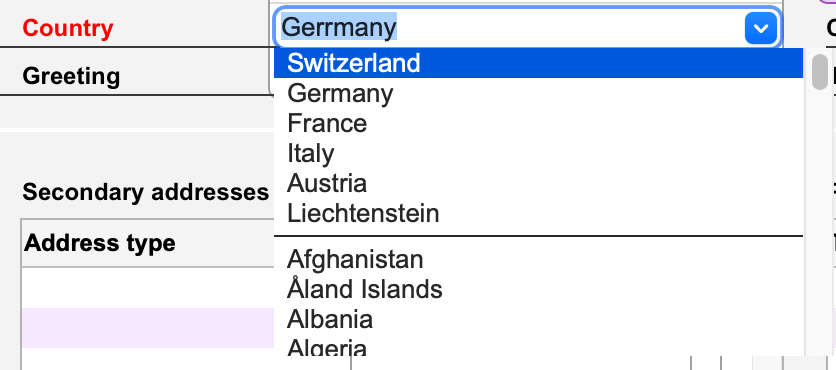
Countries are always displayed in the programme’s base language, regardless of the language of the workstation interface. You can use the up and down arrow keys on the keyboard to move through the menu, or type the first characters of the country, then press Enter to validate. If the country name you typed is not recognised, the label of the field will be displayed in red, as in the illustration above. This version of the programme automatically corrects the Country field during the update. Empty fields are replaced with ‘Switzerland’ and those containing ISO codes (such as FR or DE) are replaced with the full country name. However, the programme cannot automatically correct unknown or misspelled countries. You can find the list of unrecognised countries by going to the Coherence Test command in Maintenance and checking the Addresses: Country box. If there are any, the current selection of the Addresses file will be replaced with all Addresses that have an incorrect country or a secondary address with an incorrect country. Choose the Apply command from the Action menu, then choose Country from the Target menu. This dialogue allows you to enter the incorrect country name and the correct country name and replace them in all relevant Addresses. This operation will have to be repeated for each incorrect country.
Effects on QR-Invoices generated by Business
Version 7.4r29 from October 2025 already handled QR-invoices with structured addresses, in a hybrid format with the street and number in the same field, which is still compliant with the new standard. But this solution was not ideal because it depended on the correct entry of the street followed by the number in the first line of the Street field. For simplification, to ensure a correct QR-invoice at all times, Business no longer includes the street in the QR code at all, as it is not a mandatory field. This means that the invoice will always show the customer’s full address in the header, but the QR BVR stub will only show the customer’s name, postal code and city.
Effects on creditor payments and payments of salary slips with the PAIN.001 format
From 14 November, the old format pain.001.001.03.ch.02 from 2009 will no longer be accepted as it does not support structured addresses. We recommend that you switch to the more recent format pain.001.001.09.ch.03 if you have not already done so. This option can be set in the export format options. The same applies to payments via automatic e-banking connection via EBICS. Except for QR invoice payments where we transfer the creditor’s address from the QR code, we no longer export the street address as it is not mandatory and this prevents payments from being rejected due to an incorrect address.
Notice
We remind you that Office Maker Business allows you to enter secondary addresses useful for indicating various contacts, a delivery address, a billing address, etc. This article provides more information on this topic.
As for invoices received from your suppliers, we encourage you to enter them using a QR code reader, since these codes contain a wealth of information that you will not need to enter manually: IBAN, invoice reference number, total amount, etc. In addition, the programme allows you to set a default item if you do not want to detail the contents of the invoice.
 Français
 Deutsch
 Italiano