Starting with version 8, Office Maker Finance becomes “multi-fiscal period,” meaning that different fiscal periods can be recorded in the same data file. Until now, each fiscal period was recorded in a separate data file.
An additional Periods Editor command is now available in the File menu. When you select it, the following dialog box appears:
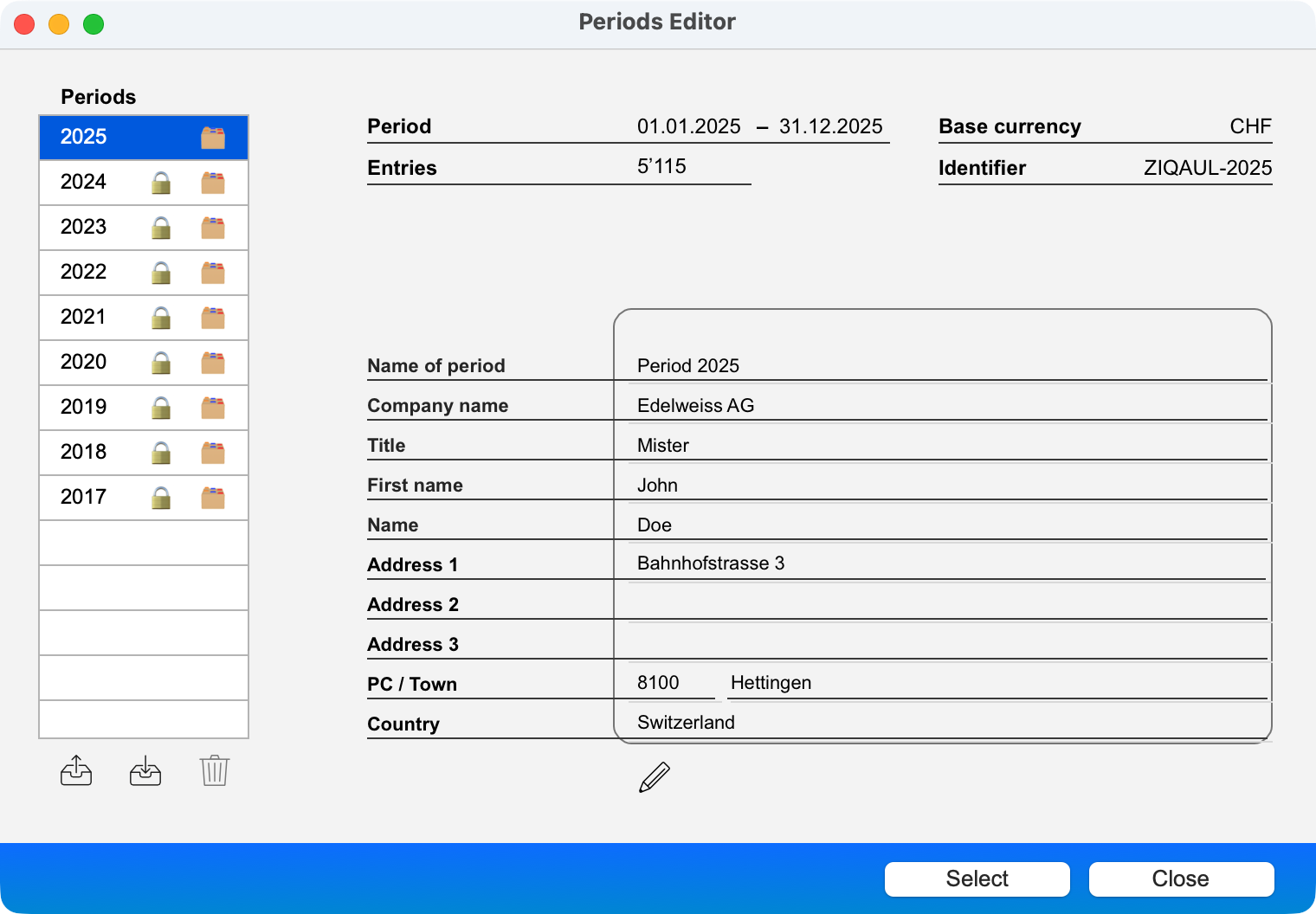 |
The dialogue consists of the following elements:
- On the left is a list of periods saved in the data file. Each period is represented by its year and may be accompanied by a padlock icon to indicate that the period is locked and a folder icon to indicate that the period has been archived.
Below the list of periods, three icons allow you to archive a period (the period data is exported to an external file in the Documents>Office Maker>Finance>Archives folder), import a period from an external file, and delete a period from the data file.
- The right-hand side of the window displays information about the selected period: period covered, number of entries, base currency, ID, and company concerned by the period. Some of this information can be modified by clicking on the pencil icon.
The periods editor performs several functions:
- Switch the current period (select the desired period from the list on the left and click the Select button). Please note that you can also switch the period by using the pop-up menu at the bottom right of the main window.
- Merging existing periods into a single data file.
|
 Français
 Deutsch
 Italiano