Operation and configuration of the showcase on the online catalog’s home page
The online catalog’s home page may contain a “showcase,” which is a banner that displays the covers of documents in the library’s collection. This showcase animates the home page and encourages library users to explore the catalog.

The option to show or hide the showcase is set in the online catalog settings, available in Maintenance (accessible via File>Maintenance) by calling up Web>Configure Public Search WebOPAC. The Display showcase checkbox is located on the General tab of the settings dialog.
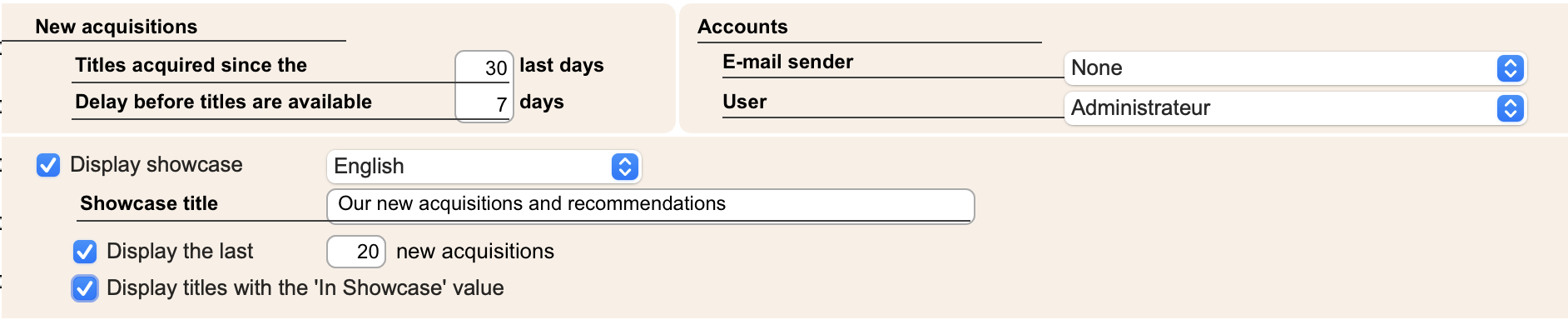
If you check the Display showcase checkbox, two other checkboxes become active:
- Display the last X new acquisitions: Check this box to automatically fill the showcase with new acquisitions (you can determine the period of time that you consider to be “new” in the “New acquisitions” section of this dialog). To avoid cluttering the showcase with too many new acquisitions, we recommend that you set a limit of 20 new items. If you do not buy any new title for a period of time, the program will automatically search for older new titles to fill the quota that you have set here. “Outdated” new titles are automatically removed from the showcase once their lifetime has expired.
- Display titles with the "In showcase" value: check this box to automatically fill the showcase with documents that you have selected yourself, for example on current topics. Note that it is unnecessary to select recently acquired titles if you have checked the box Display the X last new acquisitions. If you check the box Display titles with the "In showcase" value, you will need to select the documents to add to the showcase by checking the In Showcase box in the corresponding records on the Cover page tab or by using the Action>Apply, Purpose In Showcase command to process a batch of records.
Note: if you add documents to the showcase manually, remember to remove them before adding more. A showcase containing too many documents is not only useless (since most of the documents will in fact never be displayed), but it is also harmful because it slows down the loading of the home page.
In summary, with the Display the last X new acquisitions checkbox checked, the content of the showcase is managed automatically by the program (it chooses which documents to display and which to hide), while with the Display titles with the "In showcase" value checkbox checked, the content of the showcase is managed manually. If you check both boxes, the showcase management will be hybrid, partly automatic and partly manual.
It is important that the showcase does not contain more titles than necessary, so that the homepage loads as quickly as possible.
 Français
 Deutsch